Easy Numbering is a user-friendly way for printers (the people, not the peripherals) to automatically number forms, and print serial numbers on tickets, receipts, etc.
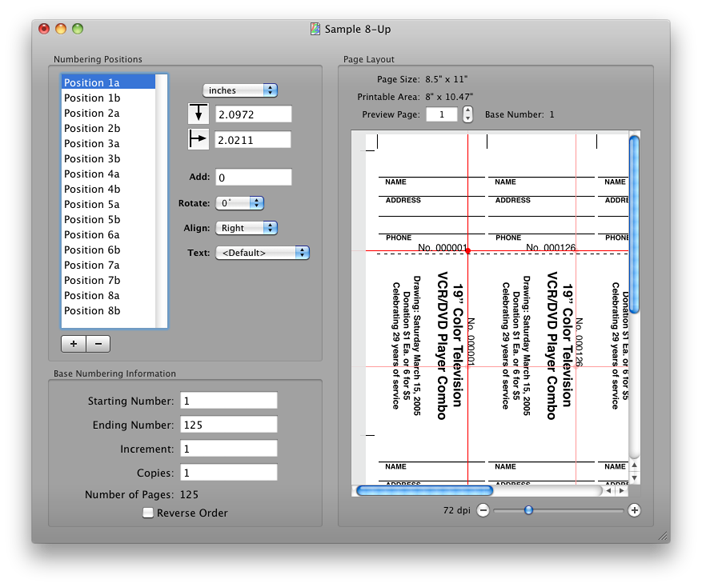
- Position your numbers visually (WYSIWYG) on the page
- Have as many numbers on a page as you want
- Rotate your numbers 0°, 90°, 180° or 270° to allow horizontal and vertical text
- Multiple text styles
- Include a background image for each page in nearly any graphic file format you choose
- Background image can be tiled, resized, and rotated
- Double-Sided Printing
- Can calculate a check digit by a variety of methods
For more detail, view the documentation online, or from the Help menu within the application
Version 3.3.5Sunday, July 8, 2018
- More options for generating check digits
- Print job will now reflect the document name, rather than "untitled"
- 64-bit
- Digitally Signed
- Bug Fixes
Version 3.3Monday, February 11, 2013
- The filename of the background image will be displayed below the page layout view in the main window.
- Check Digits can be calculated and added to the end of each number printed. (methods include MOD7, MOD9, MOD10, MOD11 with a variety of configurations) This can be configured in the Text Settings.
- The Pad with Zeroes setting has been removed and replaced with a Mask which is much more flexible allowing you to pad your number with any character you specify as well as inserting non-numeric characters in the middle of the number (eg. dashes, spaces, etc.). This can be configured in the Text Settings.
- The preview of the number in the Text Settings has been improved with the ability to modify the number displayed
Version 3.2Tuesday, September 13, 2011
- Support for PowerPC-based Macs returns! My apologies. The initial release of version 3.2 was build for Intel only by mistake.
Version 3.2Thursday, June 16, 2011
- Support for double-sided (duplex) printing. From the Settings menu, you can specify a single-sided or double-sided document.
older news...